
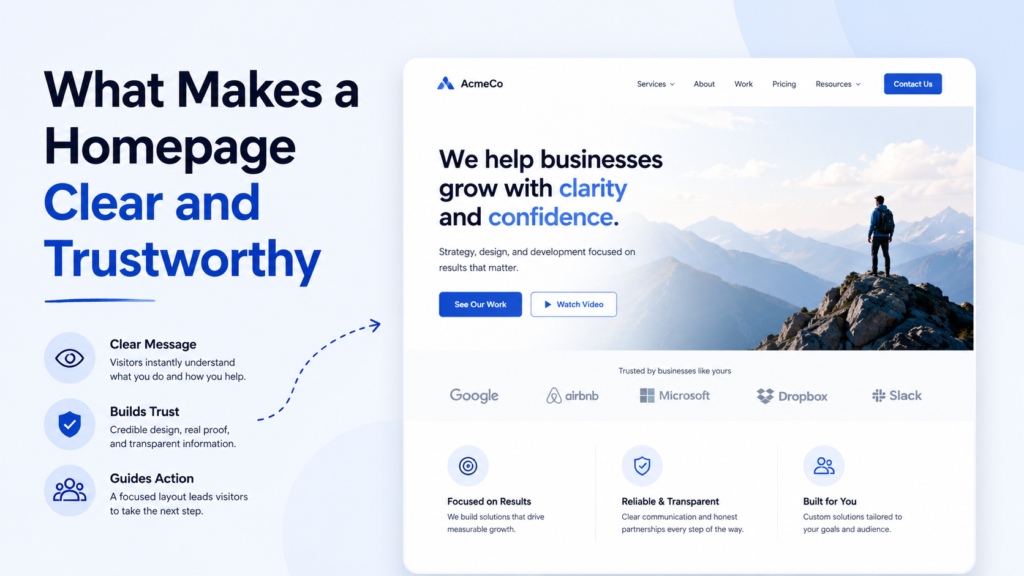
The homepage is often the first page a visitor sees. It creates the first impression and helps people decide whether they want to stay, explore, or contact the business.
A homepage does not need to be overloaded to be effective. It needs to be clear. Visitors should quickly understand what the website is about, what the business offers, and why it may be worth their attention.
A trustworthy homepage is built from several simple elements: a clear message, logical structure, useful information, proof, and an easy next step.
A Clear First Screen
The first screen is the top part of the homepage that visitors see before scrolling. This area is extremely important because it sets the context for the entire website.
A strong first screen should answer three questions:
What is this business?
What does it offer?
Who is it for?
If the headline is vague, the visitor has to work harder. Phrases like “We create digital solutions” or “Your success starts here” may sound polished, but they do not explain much.
A better homepage headline is specific. It can name the service, audience, location, or main benefit.
For example:
Website Design for Local Service Businesses
Practical Marketing Consulting for Small Companies
Custom Cabinets for Homes in Los Angeles
Specific headlines create trust because they show that the business understands what it does.
Simple Navigation
Navigation should help visitors move through the website without confusion. A small business website usually does not need a complicated menu.
The main navigation can include Home, Services, About, Blog, and Contact. If the company has several important services, the services menu can be expanded. But the structure should remain easy to scan.
Visitors should not have to guess where information is hidden. If they want to contact the business, the contact option should be visible. If they want to understand services, the services page should be easy to find.
Clear navigation makes the website feel more professional.
A Short Explanation of the Business
After the first screen, the homepage should explain the business in simple language. This section should not be too long. Its job is to give visitors enough context to continue.
A useful explanation includes:
What the business does
What problem it solves
Who it helps
What makes the approach practical or different
This is not the place for generic slogans. The text should be specific enough that a visitor can understand whether the business is relevant to them.
A clear explanation builds confidence.
Visible Services
Many visitors come to a website to check whether a company offers the service they need. That is why the homepage should include a services section.
This section can briefly present the main services and link or guide visitors to more detailed pages. Each service should have a clear name and a short description.
Avoid service titles that are too abstract. A visitor should not need industry knowledge to understand them. If the business offers website redesign, call it website redesign. If it offers repair services, name the specific repair categories.
Clear services help visitors choose faster.
Proof That the Business Is Real
Trust is not created by saying “we are trustworthy.” It is created by showing signals that make the business feel real.
A homepage can include trust elements such as:
Client reviews
Project examples
Years of experience
Location details
Photos
Certifications
Case studies
Before-and-after examples
Recognizable client types
Clear contact information
The best proof depends on the business. A local service company may benefit from reviews and location details. A creative studio may need a portfolio. A consultant may need biography and experience.
Trust signals should be easy to find, not hidden deep in the site.
A Logical Section Order
A homepage should feel like a guided conversation. The order of sections matters.
A practical homepage structure might look like this:
First screen with clear headline
Short business explanation
Main services
Why choose this business
Process or method
Proof or testimonials
FAQ or useful details
Contact call to action
This structure can change depending on the website, but the principle remains the same. Each section should answer the next natural question in the visitor’s mind.
If the page jumps randomly between topics, visitors may lose confidence.
Strong Calls to Action
A call to action tells visitors what they can do next. It can be simple: Contact Us, Request a Quote, Schedule a Call, View Services, or Read the Blog.
A homepage should include calls to action in places where they make sense. The first screen should usually have one. The services section may have another. The final section should invite contact or further reading.
The call to action should match the business model. A consultant may want visitors to book a call. A local company may want quote requests. A blog may want readers to explore articles or subscribe.
The next step should always be visible.
Contact Details That Are Easy to Find
If the website belongs to a real business, contact information should not be difficult to locate. Visitors should be able to find a phone number, email, contact form, or business location without searching too long.
For local businesses, the address or service area can be important. For online services, a contact form or booking link may be enough.
Hidden contact information can create doubt. Visible contact options create confidence.
Mobile Readability
Many visitors will open the homepage from a phone. A homepage that looks good on desktop but feels crowded on mobile can lose potential customers.
Mobile readability includes:
Short sections
Readable font sizes
Clear buttons
Proper spacing
Simple menus
Fast access to contact options
Images that do not break the layout
A trustworthy homepage should feel comfortable on small screens. If users need to zoom, search, or struggle with buttons, the design is not working properly.
Avoiding Empty Claims
Many homepages use phrases that sound professional but do not say anything specific. Examples include “high-quality service,” “innovative solutions,” “customer-first approach,” and “we help you grow.”
These phrases are not always wrong, but they need support. Instead of only saying “professional service,” explain what makes the service professional. Instead of saying “fast results,” explain the process or timeline.
Trust comes from details.
Final Thoughts
A clear and trustworthy homepage does not need to be complicated. It needs to help visitors understand the business quickly and move forward with confidence.
The most important elements are a specific first screen, simple navigation, visible services, trust signals, logical structure, clear calls to action, and easy contact options.
When these parts work together, the homepage becomes more than a welcome page. It becomes a useful starting point for real customer decisions.